

The Context Window Problem
Why Your AI Keeps Forgetting What You Told It


There’s a pattern I’ve been running into repeatedly over the past few weeks, and it took me an embarrassingly long time to diagnose.
I’d start a complex project in Claude Code — building something ambitious, a lot of back and forth with the model, deep into a workflow that required the AI to hold a lot of information its memory. I’d get 90 to 95 percent of the way there and then something would be off. Like, the model would start making suggestions that contradicted the instructions I’d given at the beginning, or it would try to fix a problem I’d identified but the outcome would actually be worse — as if it had forgotten the constraints I’d established an hour earlier.
I was close to done, and I’d somehow gotten further from done.
What was happening, I eventually realized, was that I was running out of context window. The model was literally losing track of the beginning of our conversation, and it was happening because of a fundamental architectural constraint that every AI system built on something called “transformer architecture” faces — and that most people using AI casually never encounter, because casual use doesn’t push the boundary.
The more sophisticated your AI work gets, the more inevitable this problem becomes.
I also had a smaller, more embarrassing revelation this week. I discovered there’s a small circular meter at the bottom of the Claude Code prompting window that shows you how far into the context window you are. I’ve been using Claude Code for months, and I noticed this for the first time this week — which means I’ve been flying blind while running into context limits regularly, without knowing what was causing the problem.
To be fair, I had heard of context windows and I knew conceptually what they were. I just didn’t realize that they would impact me. But as I evolved from using AI for purely generative use cases to building more complex agentic workflows, they started to crop up more without me even realizing it.
Both of these things — the fundamental architectural constraint and the practical toolkit for managing it — are things I wish I had understood better, sooner. So this issue is dedicated to context windows: what they are, why they exist, what happens when you approach the limit, and how to work around them.
What a Context Window Actually Is
Let me start with the technical reality, explained plainly.
Every major AI language model you use today — Claude, ChatGPT, Gemini, and the models they’re built on — is based on an architecture called the transformer. The transformer, introduced by Google researchers in 2017, is the architectural foundation underneath virtually all modern large language models. Understanding why context windows exist requires understanding one critical thing about how transformers work.
Transformers process language as sequences of tokens. A token is roughly three to four characters of text — this could take the form of a short word, part of a longer word, or even a punctuation mark. “Marketing” might be one or two tokens. A full paragraph might be two or three hundred.
When you send a message to an AI, the entire conversation — your original instructions, every message you’ve sent, every response the model has generated — gets converted into a stream of tokens that the model processes all at once.
Here’s the part that matters: transformers don’t process tokens sequentially, one after the other, the way older language models did. They process the entire token sequence simultaneously, in what’s called a forward pass. And during that forward pass, every single token “attends to” (looks at — and is influenced by) every other token in the sequence.
This mechanism is called self-attention, and it’s the reason transformers are so extraordinarily good at understanding language. When the model processes the word “it” in a sentence, self-attention allows it to figure out that “it” refers to “the product” three sentences earlier, not “the company” mentioned in between. The model understands relationships between words across the entire context, regardless of distance.
This is remarkable, and also remarkably expensive.
If you have N tokens in your context, every token must attend to every other token. That’s N × N relationships to compute — so, N² operations.
This means that when you double the context length, and you don’t double the compute required — you quadruple it. This is what’s called quadratic scaling, and it’s the core reason why context windows are limited. It’s not a software engineering problem that more clever code can solve. It’s a mathematical property of the attention mechanism itself.
The three constraints this creates are interconnected:
Compute cost. Processing a 200,000-token context requires vastly more computation than processing a 10,000-token context — not twenty times more, but dramatically more due to quadratic scaling. Running this at the scale of millions of simultaneous users requires enormous and expensive infrastructure.
Latency. The more tokens in context, the longer the model takes to generate a response. For real-time applications — including the back-and-forth of something like a Claude Code session — there’s a practical ceiling on how large a context can be before the response time becomes unusable.
Memory. The computations required by the attention mechanism during a forward pass have to be held in GPU memory. This memory is finite and expensive. A large context doesn’t just slow the model down — it runs out of the physical memory required to process it at all.
This is why context windows have a maximum size. It’s not arbitrary. It’s the intersection of three hard constraints that can be pushed but not eliminated.
What Happens When You Approach the Limit
Here’s where things get interesting for practical use — and where the consequences become directly visible in the quality of your work.
The context window isn’t a cliff, it’s more like a gradient of degradation. As you approach the maximum, several things start to happen, none of which is necessarily obvious to the user.
Attention dilution. Self-attention distributes “focus” across all tokens in the context. With a short context, the model can attend strongly to the most relevant parts of your conversation. As the context grows, that attention gets spread thinner. This means that instructions you gave at the beginning of a long session are still technically in the context, but they’re competing with hundreds of thousands of other tokens for the model’s attention and as a result, they become progressively less influential on the output. The model isn’t forgetting your instructions exactly; it’s just not weighting them as heavily as it once did.
Positional decay. Transformers use positional encodings to understand where each token sits in the sequence. Tokens near the beginning of a very long context are far from the current generation point, and the model’s ability to precisely reference and weight early tokens degrades with distance. Think of it like reading a book and trying to recall the exact wording of a sentence from the first chapter while you’re deep in chapter twenty. The gist is there; the precision isn’t.
Implicit compression. When the model is trying to work within a context that’s pushing its limits, it starts to deliberately compress and simplify. Rather than holding the full nuance of your earlier instructions, it operates from something more like a summary where the details get smoothed over, constraints that were specific become general, and edge cases that you explicitly addressed get dropped.
For casual use, none of this matters much. If you’re asking an AI to help you write an email or brainstorm a campaign concept, you’re nowhere near the context limit, and these effects never appear.
For complex work — building a web application in Claude Code, running a multi-step research workflow, developing a detailed content strategy across many iterations — these effects become the primary constraint on what you can accomplish. Which is exactly the situation I’ve been finding myself in.
Why This Shows Up as Bad Marketing Output
Let me make this concrete for the marketing use cases where I see it most.
You’re using Claude or ChatGPT to develop a complex campaign. You start the conversation by explaining your brand voice, your ICP, the key messages you want to hit, the specific things you want to avoid. You iterate through several drafts. You give detailed feedback. The output keeps getting better. Then, fifty messages into the conversation, you ask for one more variation — and it feels off. The voice has drifted. A phrase you explicitly said felt wrong has crept back in. A distinction you made between two customer segments has been flattened.
We’ve all experienced it.
You haven’t done anything differently. But the model is now working from an reduced version of your original context. The specific instructions you gave at the start are still technically in the window, but they’re competing with all the back-and-forth that followed, and they’re losing.
The output degrades gradually and inconsistently — which makes it particularly hard for a casual AI user like your or me to diagnose. You might assume you gave it a bad prompt, or that the model is having an off day, or that your creative brief wasn’t clear enough, when in reality, you’ve simply run out of effective context.
Why Bigger Context Windows Don’t Fully Solve This
The obvious response to everything I’ve described is to just make the context window bigger. And model providers are doing exactly that. Claude’s context window is 200,000 tokens. Some configurations of Gemini support up to 1 million tokens.
These are genuinely impressive numbers, but bigger context windows are a partial solution for several reasons.
First, the quadratic scaling problem doesn’t go away — it just gets pushed further out. A 1 million token context requires not 5x the compute of a 200,000 token context but something closer to 25x, due to the quadratic relationship. This translates directly to cost and latency.
Second, and more importantly, attention dilution and positional decay don’t disappear with larger windows — they just get redistributed across a longer sequence. Research on long-context models consistently shows what’s called the lost in the middle problem, where models are significantly better at attending to information at the beginning and end of a long context than information in the middle. If your critical instructions are at position 50,000 in a 200,000-token context, they’re in the “lost in the middle” zone regardless of how large the window technically is.
Third, larger context windows make latency and cost problems worse, not better. A 1 million token context is slow and expensive to process. For iterative work — where you need fast responses to maintain flow — this can be impractical even when it’s technically possible.
Bigger context windows give you more runway to work but the fundamental problem remains the same.
How to Know When You’re Hitting the Limit
This is where practical advice meets platform-specific reality, because different tools handle this very differently.
Claude Code in VS Code (my preferred way to work) is the most transparent about it. There’s a circular meter at the bottom of the prompting interface that shows you your context utilization in real time. When that meter starts to fill — I’d treat anything past roughly 70% as a signal to pay attention — you’re approaching the zone where degradation begins. I didn’t notice this meter for months. Now I check it constantly.
Claude.ai (the standard chat interface) doesn’t show a meter, but it will often notify you when you’re approaching the context limit — a message indicating the conversation is getting long and suggesting you start a new chat. Take this seriously. It’s not a polite suggestion.
ChatGPT handles long contexts by silently summarizing earlier parts of the conversation rather than including them in full. This means you can have a very long conversation without hitting a hard cutoff, but the cost is that older instructions and context are being compressed and potentially distorted as the session progresses. You won’t get an error — you’ll just get gradually worse output.
Gemini in Google Workspace is similar to ChatGPT in that it doesn’t provide obvious visual feedback on context usage. Long conversations can drift without warning.
Claude Cowork and other agentic tools are particularly susceptible because agentic workflows inherently involve a lot of back-and-forth, tool calls, and state management — all of which consume context aggressively. If you’re running a long agentic task and the quality of decisions starts to degrade midway through, context exhaustion is a leading suspect.
While not all platforms make it easy to know when you’re running out of context, the good news is that there are specific behavioral signals you can watch for:
The model contradicts instructions you gave earlier in the session.
Solutions you explicitly ruled out come back as suggestions.
The output loses the specific constraints and voice characteristics you established at the start.
When you point out an error, the model either can’t fix it correctly or reverts to the error after a few more turns.
It starts asking you to re-explain things you already explained.
These are all symptoms of context exhaustion, even if the window isn’t (yet) completely full.
Bottom line: if you’re getting output that feels like the model has lost the thread of what you were trying to do, it probably has.
Best Practices: Working Within the Constraint
The context window is an architectural reality. You can’t eliminate it, but you can design your AI workflows to work with it rather than against it.
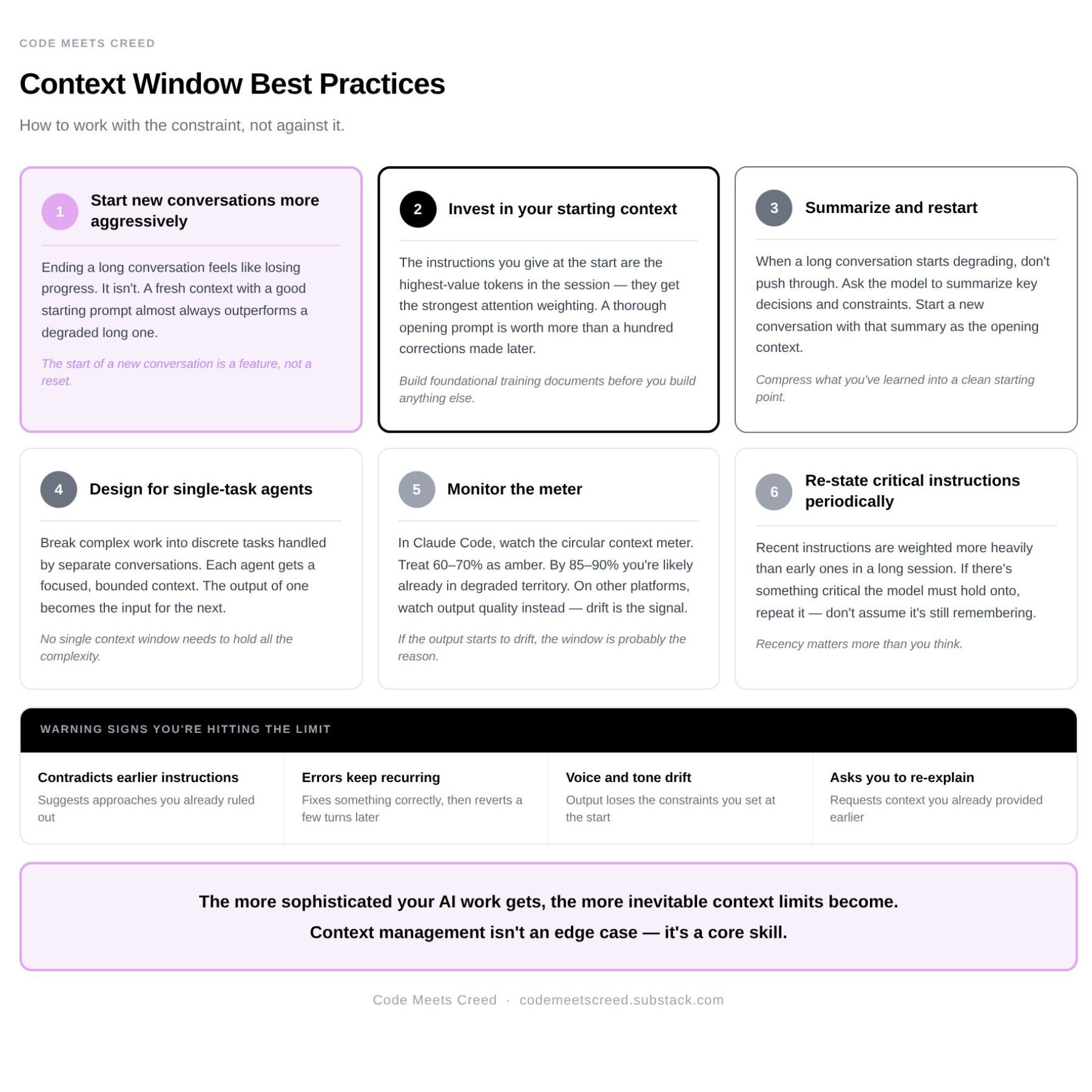
Here are the practices I’ve been developing.
Start new conversations more aggressively. This is the single highest-leverage change most people can make. There’s a natural psychological resistance to ending an ongoing conversation because it feels like you’re losing the progress you’ve made. But a fresh context with a well-constructed starting prompt will almost always outperform a degraded long context. Expect that as your AI use cases get more mature and complex, you’ll need to assume your work with span multiple conversations.
Invest in your starting context. The instructions and context you provide at the beginning of a conversation are the highest-value tokens in the entire session — they’re consistently present, they get the strongest attention weighting, and they anchor everything that follows. A thorough, specific, well-organized starting prompt is worth more than any number of corrections made fifty turns into a degraded context. This is one of the core reasons I invested in building foundational training documents for Sequel before I built anything else, and why I’m meticulous about prompting.
Summarize and restart. When a complex conversation has produced good output but you’re starting to see degradation, don’t push through. Instead, ask the model to summarize the key decisions, constraints, and progress from the current conversation. Copy that summary and start a new conversation with the summary as your opening context. This technique effectively “compresses” what you’ve learned into a new, clean starting context.
Design for single-task agents. This is one of the most important things I’ve learned from working in Claude Code. Instead of asking one agent to do a complex, multi-step task in a single long conversation, break the work into discrete tasks handled by separate conversations or agents. Each agent gets a focused task with a singular goal and clean context. The output of one becomes the input for the next. This type of system as a whole can handle far more complexity than any single agent can, because no single context window has to hold all of it. This is exactly the direction agentic AI development is heading — multi-agent architectures where specialized agents handle specific subtasks and hand off to each other, rather than single generalist agents trying to do everything in one continuous conversation. The context window limitation is a primary reason this architecture works better.
Monitor the meter. In Claude Code, watch the context meter. I’d recommend treating 60-70% as an amber signal — time to start wrapping up what you’re working on and planning how to continue in a fresh context. By the time you’re at 85-90%, you’re likely already in degraded territory.
Keep your most important instructions as close to the current position as possible. Due to positional decay, instructions given recently are weighted more heavily than instructions given early in a long session. In practice, if there’s something critical you want the model to recall in a long conversation, re-state it periodically rather than assuming it remembers from earlier.
Recognize that more complex work means more context management. This is perhaps the most important mindset shift. The workflows that will create the most value with AI — building applications, orchestrating multi-step processes, generating production-quality complex outputs — are exactly the ones that push context limits hardest. As your AI work gets more sophisticated, context management stops being an edge case and becomes a core skill. The marketers who figure this out early will have a significant advantage over the ones who keep wondering why their ambitious projects keep getting stuck at ninety percent.
The context window problem is something AI experts a whole lot smarter than me are actively working on, but it’s unlikely to be solved in the near term.
For the foreseeable future, working intelligently with context windows — knowing what they are, recognizing when you’re approaching them, and designing workflows that don’t depend on unlimited context — is an important skill for anyone doing serious work with AI.
The good news is that the skill is learnable. The discipline of starting clean, investing in context quality, and designing for discrete tasks makes your AI work better even when you’re nowhere near a context limit. The habits are good ones regardless.
Tools, Platforms & Resources Mentioned in This Issue
Claude Code — The primary context for this issue. The agentic coding environment where the context window problem surfaced most visibly.
Claude.ai — The standard conversational interface. Does not display a context meter, but will surface a notification when a conversation is approaching its limit. Take that notification seriously.
ChatGPT — Handles long contexts by silently summarizing earlier parts of the conversation rather than truncating. No visible context indicator. Degradation happens gradually and without warning — watch output quality for drift.
Gemini — Google’s AI interface, embedded throughout Google Workspace. No visible context indicator. Long conversations can drift without announcement.
Cowork — Anthropic’s agentic desktop tool for non-technical users. Particularly susceptible to context exhaustion because agentic workflows consume context aggressively through tool calls and multi-step state management.
VS Code (Visual Studio Code) — The code editor used to access Claude Code in this workflow. Relevant here because it's the environment where the context meter is visible — the circular utilization indicator appears at the bottom of the Claude Code extension panel within VS Code. If you're using Claude Code directly in the terminal rather than through the VS Code extension, you may not see the same visual feedback.
💜 A note on my content:
Yes, I use AI to help me write this newsletter. Every idea, insight, and point of view here is mine. AI helps me think, structure, and draft — it does not replace my judgment. I also use em dashes (and emojis 👀) unapologetically, sometimes because AI likes them, and sometimes because they’re grammatically correct. If you’re here to sniff out “what was written by AI,” you’ll probably be disappointed. And if you’re fundamentally against the use of AI in writing, this newsletter is likely not for you. You’ll find this disclaimer in every issue, because transparency matters to me.