

On Writing Bad Prompts
And Why AI Does It Better


I’ve been using generative AI since ChatGPT launched, and for most of that time, I was doing it wrong.
Not completely wrong. I was getting results. Writing blog posts, drafting emails, generating ideas. The AI was responding, but the quality was inconsistent. Sometimes I’d get something brilliant. Other times, I’d get generic garbage that sounded like every other AI-generated piece of content on the internet.
I kept thinking the problem was the platform. Or that I needed to learn more about the technology. Or that I just wasn’t cut out for this.
Then, about a year ago, I realized: I was terrible at writing prompts.
The thing is, I knew prompts mattered. I’d read about prompting frameworks. I knew you were supposed to give context and define roles and set objectives and add guardrails (I’ve written in a previous issue about the five-part prompting framework I like to use).
But knowing what makes a good prompt and actually writing one are two different things.
Writing good prompts takes thoughtfulness and detail. And honestly, I’m impatient. Most of us are. We have an idea, we want to see it come to life, and we don’t want to spend fifteen minutes crafting the perfect prompt to make it happen.
So instead of slowing down and building a good prompt, I’d type in a quick question, give some basic context, hit enter, and then wonder why the output was bad.
My Big Breakthrough
The breakthrough came when I stopped trying to write better prompts and started asking AI to write them for me.
I know. It’s almost embarrassingly obvious in hindsight.
AI knows what it needs to produce great output. It understands its own requirements better than I (or any of us, really) ever will. So why was I sitting there, struggling to remember if I’d included enough context or defined the right guardrails, when I could just ask the AI to help me structure the request?
Now, my process looks completely different.
I start by brain dumping. But here’s the key — I don’t do it by typing. I do it by talking.
I use Otter on my phone. I open the app, hit record, and just start talking through whatever I’m thinking — pure stream of consciousness. No organization required, no polish needed — just verbally vomiting every thought I have about the topic I’m working on.
What I like about Otter (as opposed to just using voice mode in an AI app) is that it transcribes as I speak, so I can see it’s catching everything. It only took a few experiences of speaking into AI for minutes on end and telling it my best ideas, only to have it respond with some version of “sorry, I didn’t get that — can you try again?” for me to realize that approach wasn’t going to work.
I also like Otter because it stores everything in one place. And because I use it for all my voice notes and meeting recordings, I can actually query Otter itself later — it’s almost like having a conversation with my own memory.
For shorter thoughts, I use an app called Wispr Flow. It’s voice-to-text, and it’ll transcribe directly into ChatGPT or Claude or any interface where I would otherwise type (including email, Slack, etc.). It’s super quick and requires no switching between apps.
The point is: I’m not trying to organize my thoughts before I give them to AI. I’m just dumping everything I know about the topic — objectives, audience, guardrails, examples, whatever comes to mind.
Then I tell it what I’m trying to do.
“Your goal is to write a blog post for my Substack. The audience is marketing leaders who are trying to figure out how to use AI effectively. The tone should be personal, not overly promotional. I want it to feel like a conversation, not a listicle. Don’t use the word ‘quietly’ — everyone uses that and it sounds dramatic and fake. Here’s all my thinking on the topic [paste voice transcript]. Now, write the prompt for me.”
And it does.
The prompt it writes back is detailed and structured — way better than anything I would have written on my own if I’d sat there trying to remember all the components of a good prompt.
Saving What Works
Once I have a good prompt, I don’t want to recreate it from scratch the next time I need something similar.
I used to save prompts in a Google Doc. That worked fine until I needed to actually use one, at which point I’d have to open the doc, scroll around, copy it, paste it into ChatGPT, and hope I grabbed the right version.
Now I use Text Blaze.
It’s a Chrome extension that lets you save any text snippet and assign it a shortcode. So, for example, I have a detailed prompt I use every time I create the featured image for this Substack. I saved it in Text Blaze with the shortcode “/fimage”. Now, every time I work on a new issue, I go into the AI platform I use to create my images — Reve.com — type that shortcode, and it instantly pastes the full prompt. The result is a set of consistent, on brand images that I’m able to create in less than 5 minutes per issue.
I learned about Text Blaze from Ryan Staley in an AI course I took through Pavilion. He shared his entire Text Blaze folder with everyone in the course, and we all immediately got access to his prompts. That’s when I realized this wasn’t just useful for me personally — it was scalable.
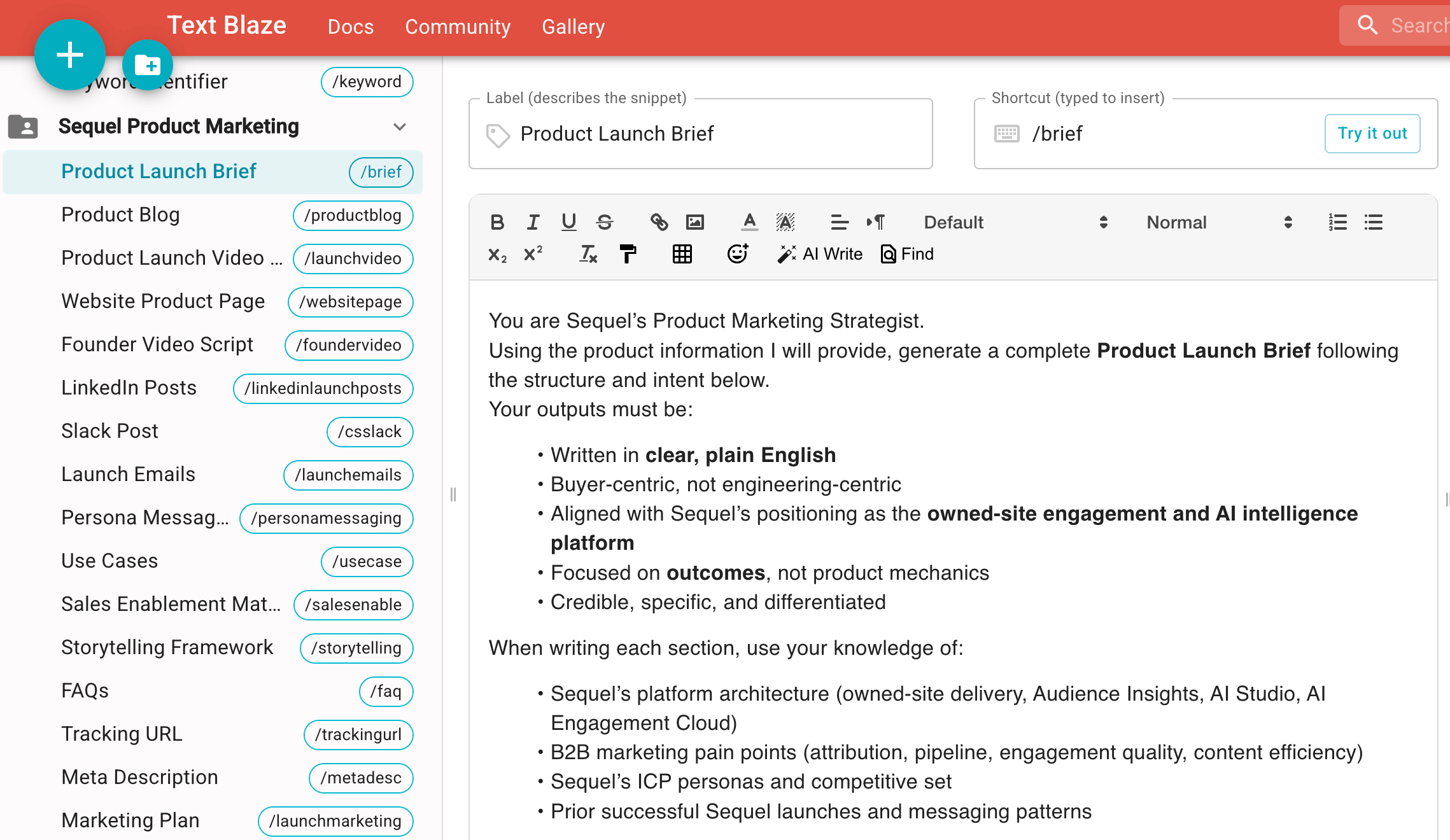
If you’re working with a team and you want everyone to use consistent prompts, you can share folders in Text Blaze. Suddenly, you’re not just making your own AI work better. You’re making your entire team’s AI work better.
Making the System Smarter Over Time
The other thing I do now that I didn’t do before: I iterate on my saved prompts.
Every time I use a saved prompt, I pay attention to what works and what doesn’t. If I have to go back into the chat and say “actually, add this” or “do this differently,” I recognize that as a sign that the prompt isn’t quite right yet.
So I’ll take the prompt back to my AI platform of choice and say: “Here’s my existing prompt. It produced this output. I wish the output had included X. Please update the prompt to include guidance that will produce the output I want.”
Then I save the improved version back into Text Blaze.
Over time, my system gets smarter, the prompts get better, the outputs get more consistent, and I spend less time fighting with AI to get what I want.
What Changed
I don’t think I’m much smarter about AI now than I was a year ago. I just have a better system.
That system has a few key parts:
I brain dump via voice instead of typing. This gets my unstructured thoughts into AI faster and with less friction.
I let AI write the prompt. It knows what it needs better than I do.
I save prompts I’ll reuse. Text Blaze makes this effortless.
I iterate and improve saved prompts over time. Every use is a chance to make the system better.
The biggest shift, though, was that I stopped treating prompting like something I needed to master on my own and started treating it like something I could get help with — from the AI itself.
If you’re using generative AI and you’re not asking it to write your prompts, you’re working harder than you need to. Let it do what it’s good at, then save what works, then make it better over time.
That’s it. That’s the system.
— Kathleen
Tools, Platforms & People Mentioned
Here’s a list of the tools and platforms referenced in this issue:
Otter - Voice transcription app that also has a built-in LLM you can query
Wispr Flow - Voice-to-text app that transcribes directly into any text field
Text Blaze - Chrome extension for saving and reusing text snippets via shortcodes
Reve - AI image creation.
Ryan Staley - An AI expert worth following who taught Pavilion’s first AI course and introduced me to Text Blaze.
Pavilion - Private community for go-to-market executives.
💜 A note on my content:
Yes, I use AI to help me write this newsletter. Every idea, insight, and point of view here is mine. AI helps me think, structure, and draft — it does not replace my judgment. I also use em dashes (and emojis 👀) unapologetically, sometimes because AI likes them, and sometimes because they’re grammatically correct. If you’re here to sniff out “what was written by AI,” you’ll probably be disappointed. And if you’re fundamentally against the use of AI in writing, this newsletter is likely not for you. You’ll find this disclaimer in every issue, because transparency matters to me.