

The AI Platform Decoder
A Marketer's Guide to What to Use and When

A quick note on what this issue is and isn’t: there are dozens of AI platforms, models, and tools out there, and new ones launch every week. This is not an attempt to list them all, rank them, or declare a winner. The landscape is changing too fast for any of that to stay useful. What I’m trying to do instead is give you a mental model — a taxonomy — for understanding the fundamentally different types of AI tools that exist, what each type is designed to do, and how to know which one you actually need for a given task. This is the guidance I wish I’d had when I started. It’s also what would have saved me a fair amount of awkwardness when our CTO asked me why I needed access to Claude Code and what I planned to use it for. I didn’t have a crisp answer, because I didn’t yet have a framework for understanding where it fit relative to everything else. Hopefully this saves you that conversation. Get the framework right and the specific tool choices become much easier to make.
Lately, I feel like I keep having the same conversation.
Someone at a conference mentions they’ve been using ChatGPT. Someone else says they’ve switched to Claude. A third person asks about Gemini. Someone in the back mentions they’ve heard about Claude Code and wants to know if they need it. Everyone nods along, but nobody’s quite sure they’re talking about the same thing — because they’re not.
ChatGPT, Claude, and Gemini are all “AI.” So is Claude Code. So is Microsoft Copilot. So is the AI embedded in your CRM. But comparing them directly is like comparing a Swiss Army knife to a power drill to a custom-built fabrication machine. They’re all tools. They are not the same tool. And using the wrong one for the job — or worse, avoiding all of them because the landscape feels too complicated to navigate — is costing marketers real time and real leverage.
This is my attempt to try to cut through it.
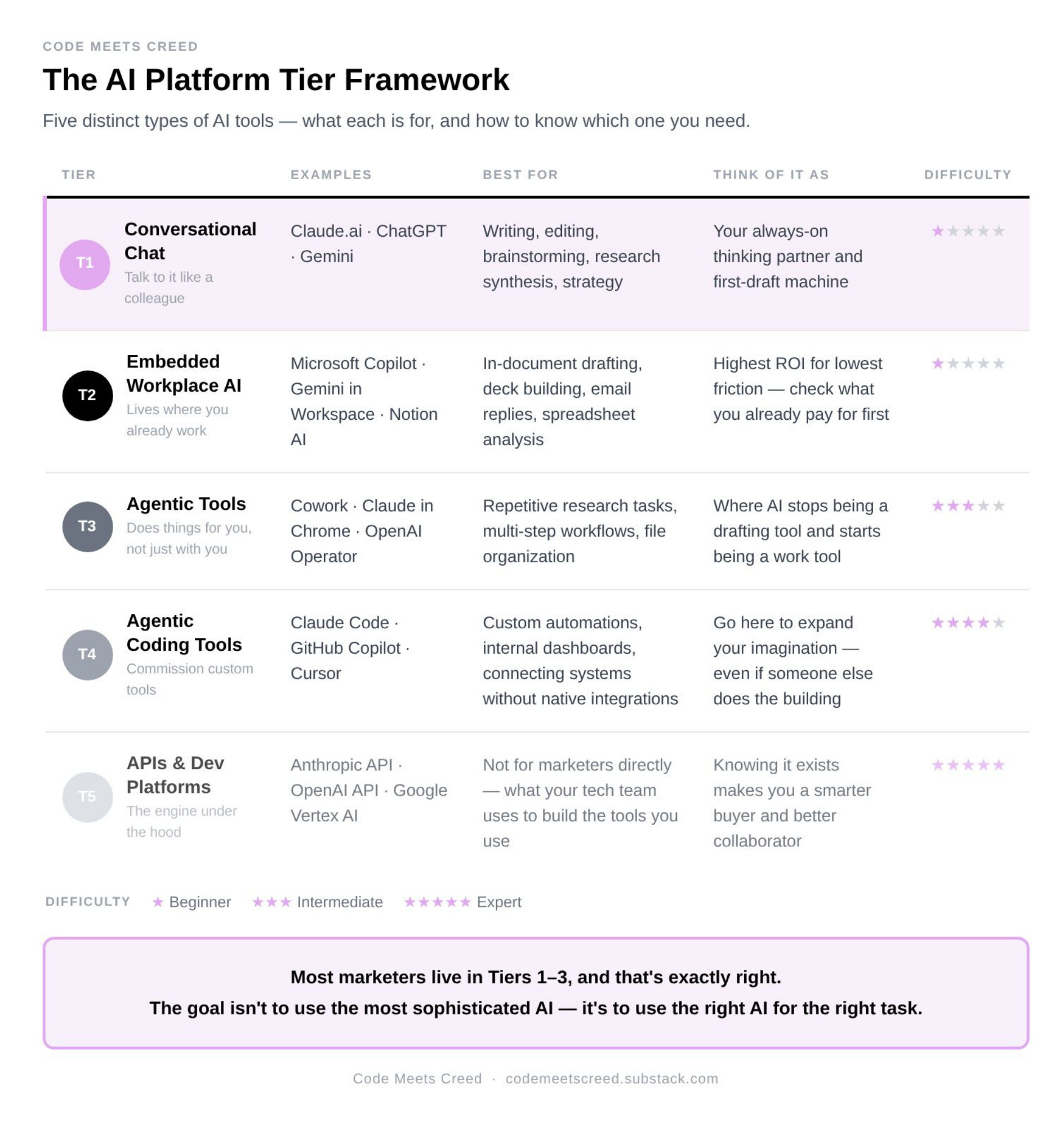
The most useful way I’ve found to think about AI platforms is not by brand or by model version — it’s by what the tool is fundamentally designed to do, and how much technical lift is required to use it. Once you understand the five distinct tiers of AI tooling, the question of “which AI should I use?” becomes much more tractable.
The Five Tiers of AI Tools
Tier 1: Conversational AI Chat Interfaces
Talk to it like a smart colleague
What it is: A browser or app-based interface where you type a request — a question, a task, a draft you want improved — and the AI responds. There’s no installation beyond downloading an app, no configuration, no technical knowledge required. You open it, you type, it responds. That’s it.
Who makes them: This is where the names you hear most often live. Claude.ai from Anthropic. ChatGPT from OpenAI. Gemini from Google. Each has a free tier and a paid tier (typically around $20/month) that unlocks more powerful models and features.
What marketers use it for: Almost everything you’d think to use AI for starts here. Writing and editing — first drafts of blog posts, emails, social content, sales decks, campaign briefs. Research synthesis — paste in a report and ask it to pull out the key findings. Brainstorming — messaging frameworks, positioning angles, campaign concepts. Strategic thinking — use it as a thought partner to pressure-test an idea before you bring it to the team. Summarizing long documents. Translating jargon into plain language. Building personas. Drafting RFPs.
If you only use AI at this tier, you are already getting significant value. Most marketers are here, and there’s nothing wrong with that.
Difficulty level: ⭐ Beginner. If you can write an email, you can use these tools. The only real skill is learning to write better prompts — which mostly means being more specific about what you want.
Pros: Instantly available. Versatile. Zero learning curve. Works for an enormous range of tasks. Free to start.
Cons: The AI doesn’t remember your previous conversations by default (though this is improving). Output lives only in the chat window — you have to copy it somewhere. It cannot take action in the world on your behalf; it can only give you something to act on.
Think of it as: Your always-on thinking partner and first-draft machine. The place to start with almost any task before deciding whether you need something more specialized.
Tier 2: AI Embedded in Tools You Already Use
AI that lives where your work already happens
What it is: AI capabilities built directly into the productivity tools your team already uses every day — so there’s no new interface to learn, no tab-switching, no copy-pasting. The AI is just... there, inside the tool you’re already in.
Who makes them: Microsoft Copilot lives inside Word, Excel, PowerPoint, Teams, and Outlook — the full Microsoft 365 suite. Google’s Gemini is embedded throughout Google Workspace — Docs, Sheets, Slides, Gmail, Drive. Anthropic has beta products that put Claude inside Excel and PowerPoint. Tools like Notion AI, HubSpot’s AI features, and Salesforce Einstein operate on the same principle — AI embedded in the specific platform, working with your actual data and files.
What marketers use it for: Drafting in-document without leaving the document. Asking your email client to write a reply from bullet points. Having your spreadsheet tool generate analysis and summaries. Building presentation decks from an outline. Summarizing a week of meeting recordings in your collaboration tool. The key differentiator from Tier 1 is that the AI is working with your actual files and organizational data, not in a separate window.
Difficulty level: ⭐ Beginner. You already know the interface. AI is a new button inside a tool you’re comfortable with.
Pros: Zero workflow disruption. Operates on your real documents and data. No copy-pasting between tools. Often included in subscriptions your organization already pays for.
Cons: More constrained than standalone chat — the AI is limited to what the host platform allows it to do. Quality can vary significantly depending on the platform. If you live in Google Workspace, Gemini embedded there may be more useful than a technically “better” model you have to switch windows to access.
Think of it as: AI that quietly joins the workflow you already have. Highest ROI for the lowest friction.
Tier 3: Agentic Tools for Non-Technical Users
AI that does things for you, not just with you
What it is: This is where something fundamentally different starts to happen. Tiers 1 and 2 are about AI that responds to you — you ask, it answers, you take the output and do something with it. Tier 3 is about AI that can take autonomous action on your behalf. It can browse the web. It can manage files. It can move through multiple steps of a task — click here, extract this, organize that, deliver the output — without you needing to supervise each step. And critically, it’s designed for people who don’t write code.
Who makes them: Anthropic has two products here. Cowork is a desktop tool built specifically for non-developers that can automate file management and multi-step task workflows. Claude in Chrome is a browsing agent — it can navigate websites and take actions within them. OpenAI’s Operator works similarly. This tier is still early and evolving rapidly.
What marketers use it for: Automating repetitive research workflows — instead of opening fifteen tabs and copying information into a doc yourself, the agent can do it. Organizing and processing files across a project. Tasks that currently require you to click through several tools in a specific sequence. Monitoring and summarizing information from multiple sources on a schedule.
Difficulty level: ⭐⭐⭐ Intermediate. No coding required, but you need to think differently — in workflows and processes, not just individual prompts. Setup takes more time. And because the AI is taking action rather than just producing text, errors have more consequence. These tools require oversight, especially while you’re learning what they can and can’t reliably do.
Pros: Genuinely frees up time on multi-step, repetitive tasks. Can work in the background. Starts to feel like actual leverage rather than just faster writing.
Cons: Still maturing. Prone to mistakes in ways that Tier 1 isn’t. Requires you to think carefully about what you’re delegating and to check the output. The setup investment is real before the payoff arrives.
Think of it as: The first tier where AI stops being a drafting tool and starts being a work tool. High upside, but approach with patience.
Tier 4: Agentic Coding Tools
Build things that don’t exist yet
What it is: AI that writes, runs, tests, and debugs actual code — and does so conversationally, without requiring you to already know how to program. This sounds like it should live in the “for developers only” category. It doesn’t, entirely — though it does require more technical comfort than the previous tiers. What it enables is something genuinely new for non-technical marketers: the ability to commission custom software.
Who makes them: Claude Code from Anthropic. GitHub Copilot and Cursor from the developer ecosystem. These tools live in coding environments (typically something called VS Code, a text editor developers use) rather than in a browser interface.
What marketers use it for: Building custom automations that no off-the-shelf tool offers. Creating internal dashboards that pull and display data exactly the way you need it. Processing and reformatting data at scale. Connecting systems that don’t have native integrations. Scraping structured information from websites. Building simple internal tools — a custom reporting template, a workflow your team will use repeatedly.
I spent several nights earlier this year learning Claude Code from scratch — you can read about that experience in Issue 7. The short version: it’s harder than people make it sound, the documentation assumes knowledge you may not have, and the learning curve is real. But what I came out with was not just a tool I’d built — it was an expanded imagination for what’s possible. I understand now what can be built, which means I can be a better architect of systems even when someone else is doing the actual building.
Difficulty level: ⭐⭐⭐⭐ Advanced. You need comfort with concepts like file structures, terminal commands, and error messages — even if you’re not writing the code yourself. Don’t start here unless you’re prepared for frustration before breakthrough.
Pros: Unlocks a category of capability that simply didn’t exist for non-technical marketers before. Custom tools, built to your exact specification, without a developer queue.
Cons: Steep learning curve. High risk of errors if you don’t understand what’s being built. The time investment before payoff is significant. This is not where most marketers should start.
Think of it as: The tier where you go to expand your imagination about what’s possible — not to become a full-time developer. In the builder-architect-operator framework I wrote about in Issue 7, this is where you spend time in Builder mode: not to ship to production, but to understand the category well enough to architect it intelligently. Go deep enough to know what you’d ask for. Stop before you become the person maintaining it.
Tier 5: APIs and Developer Platforms
The engine under the hood
What it is: Direct programmatic access to the underlying AI models — the raw capability that everything else is built on top of. When a developer says they’re “calling the API,” they’re accessing the model directly, without any interface layer, to build something custom: a product feature, an internal tool, an integration between systems, a workflow that runs at scale.
Who makes them: Anthropic’s API. OpenAI’s API. Google’s Vertex AI and AI Studio. Every major AI company makes its models accessible this way for developers and technical teams.
What marketers use it for: Not directly — this is what your engineering or data team uses to build the tools you then use. But understanding that this tier exists is important, because it explains the AI-powered landscape around you. The AI features in your CRM, your SEO platform, your content tool, your analytics dashboard? Almost all of them are built on top of one of these APIs. The vendor didn’t build the model — they built an application on top of a model. Understanding this helps you ask better questions when evaluating vendors, and helps you understand what your engineering colleagues are building when they talk about “integrating AI.”
Difficulty level: ⭐⭐⭐⭐⭐ Expert. Requires developers. Full stop.
Pros: Maximum flexibility. Can be embedded in anything. Enterprise-grade scale, control, and customization.
Cons: Inaccessible without technical resources.
Think of it as: The foundation everything else is built on. You don’t use it directly — but knowing it exists makes you a smarter buyer, a better collaborator with technical teams, and a more effective architect of AI-powered systems.
A Note on the Providers
Within each tier, you’ll encounter products from several major companies — and new ones appear regularly. I’m deliberately not trying to rank them all here, because the landscape shifts faster than any newsletter can track. What I will say is that the choice of provider within a tier often matters less than the choice of tier itself. A marketer using ChatGPT’s chat interface for the right task will get better results than one using a technically superior model for the wrong task.
That said, within the Anthropic family specifically — since that’s the ecosystem I’ve come to rely on most — here’s how the different products map to the tiers:
Claude.ai → Tier 1. This is the conversational interface, available on web, mobile, and desktop. It’s where I do the majority of my day-to-day AI work: writing, editing, research synthesis, thinking through strategy, drafting content. If you use one Anthropic product, this is the one to start with.
Claude in Excel / Claude in PowerPoint → Tier 2. Beta products that embed Claude inside Microsoft Office tools, enabling AI assistance without leaving the document you’re working in.
Cowork → Tier 3. Anthropic’s desktop tool for non-developers, designed to automate file management and multi-step workflows. I’m still early in my use of this one, but it represents exactly the kind of agentic capability I described above — AI that acts, not just responds.
Claude in Chrome → Tier 3. A browsing agent that can navigate websites and take actions within them. Also still in beta and evolving rapidly.
Claude Code → Tier 4. The coding environment I wrote about in Issue 7. The most powerful, the hardest to learn, and the most transformative once you do.
Transparently, I spent the first couple of years of the generative AI era primarily in ChatGPT. It was the first tool I learned, the one I was most comfortable with, and the one I defaulted to out of habit as much as anything else. Over the past year, I’ve shifted my primary usage to Claude — and I’ve stayed for two specific reasons.
The first is expository writing. When I need to explain something complex in clear, well-structured prose — the kind of writing this newsletter demands — Claude consistently outperforms what I was getting elsewhere. It doesn’t over-bullet. It doesn’t default to the same sentence structures. It writes the way a thoughtful person writes, which matters a great deal when your goal is to sound like yourself rather than like a press release.
The second is the flexibility that comes from having Claude Code in the same ecosystem. Being able to move fluidly between a conversational interface for thinking and writing, and a coding environment for building when the task demands it, within the same platform and with the same underlying model, has changed how I work. I still think there are tasks where other tools have edges — Google Gemini’s integration with Workspace is genuinely useful if that’s where your team operates, and for tasks requiring very current information, a tool with live web access has an advantage. But for the combination of writing quality and ecosystem range, Claude is where I live now.
You Don’t Need to Master All Five Tiers. Here’s Why That’s Okay.
There’s a version of this essay that ends with a challenge: go explore every tier, push yourself, get uncomfortable. And I do think some productive discomfort is valuable — I wrote about exactly that in Issue 7 when I spent several nights teaching myself Claude Code from scratch.
But I also want to be honest about something first.
If you’ve been scrolling LinkedIn lately, you’ve probably seen the posts. People automating their entire workflows. People who’ve built custom AI tools and agentic pipelines and systems that practically run themselves. People who make it sound like if you’re not operating at Tier 4 or 5, you’re falling behind.
Here’s my take: most of that is highlight reel, and most of it doesn’t reflect where the majority of marketers actually are or need to be.
Tiers 1, 2, and 3 — conversational chat, embedded workplace AI, and agentic tools for non-technical users — cover the vast majority of what marketing leaders actually need from AI. If you’re doing your best thinking in Claude.ai or ChatGPT, drafting faster, researching smarter, and beginning to let an agentic tool handle repetitive workflows, you are not behind. You are in exactly the right place for where this technology is right now and for what your job actually demands.
The only thing I’d encourage — and this connects back to the builder-architect-operator framework from Issue 7 — is that it’s worth having at least some exposure to Tier 4, even if you never use it regularly. Not because you need to become a power user of Claude Code. But because understanding what it can do changes how you think. It changes the questions you ask. It changes what you believe is possible. And those things matter even if someone else is doing the actual building.
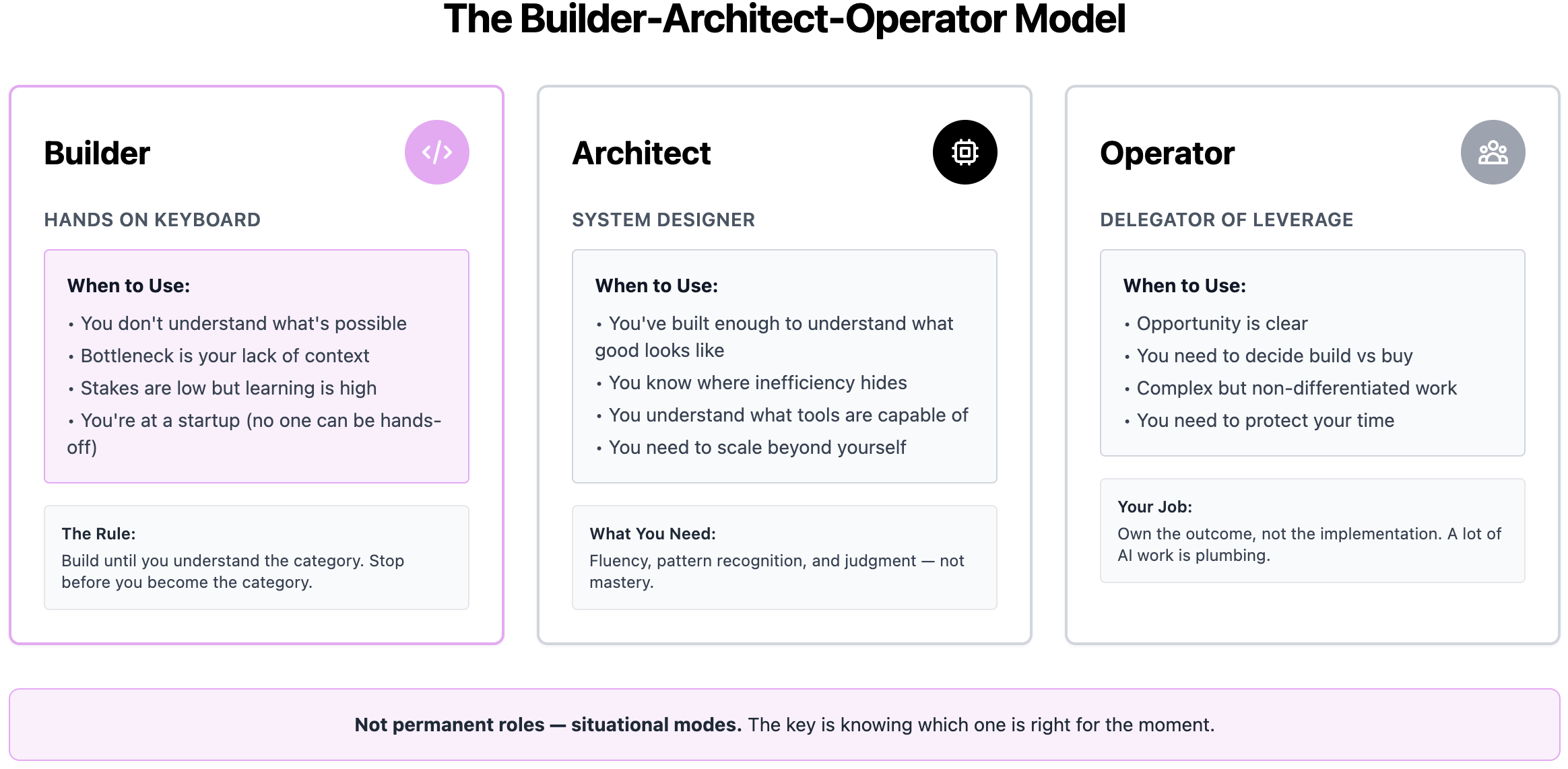
In the language of that earlier framework: the Architect still needs to understand what the Builder can make. You don’t have to lay the pipe. But you should know what the pipes are capable of.
There’s no one right answer here. There’s no tier you’re supposed to be at by a certain date. There’s just the right tool for the job you have today, and a curiosity about what the other tools might make possible tomorrow.
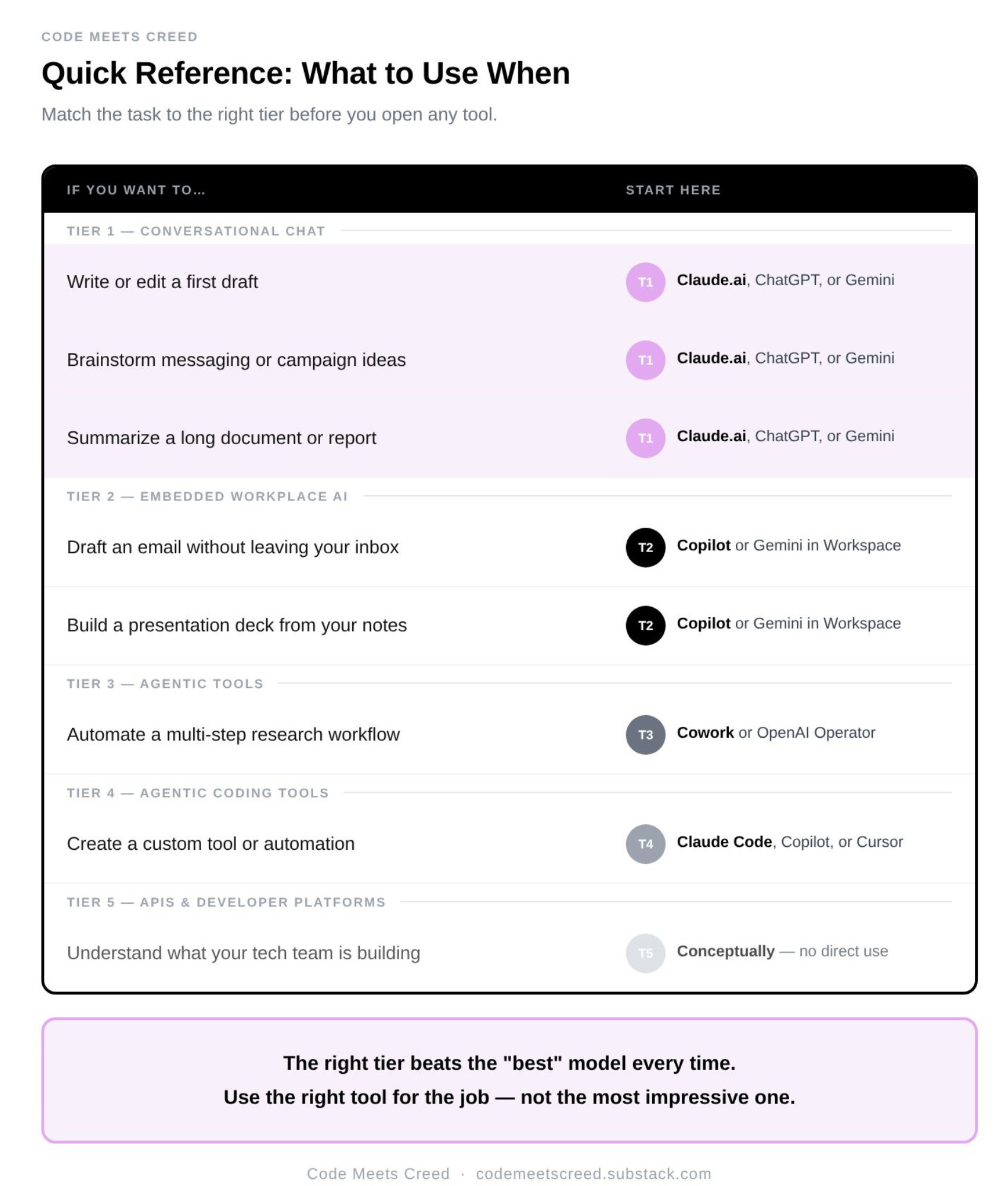
Before you open any AI tool, ask yourself one question: what am I actually trying to accomplish?
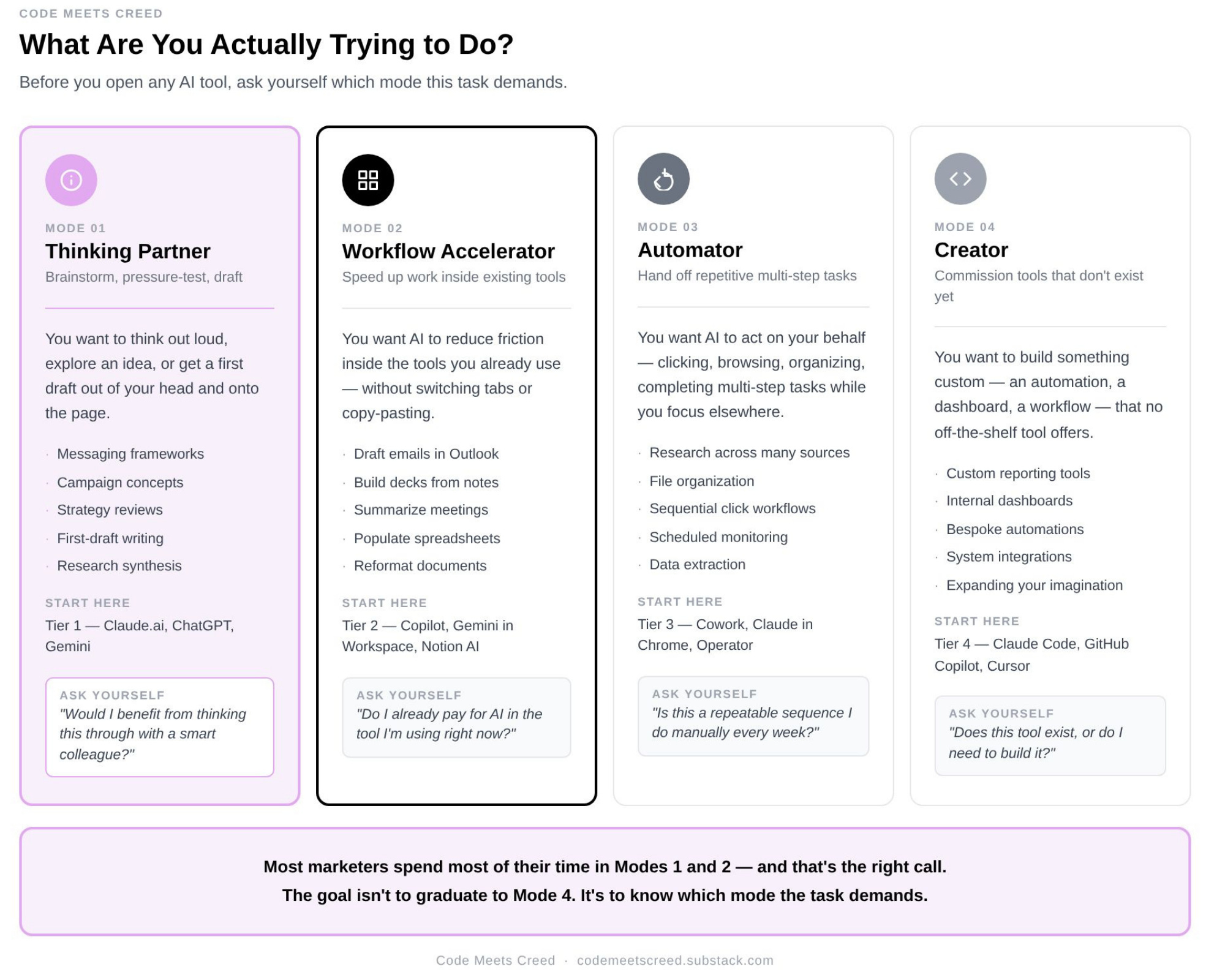
If you want a thinking partner — something to brainstorm with, draft with, pressure-test ideas with — start at Tier 1. Open Claude.ai, ChatGPT, or Gemini and start talking.
If you want a workflow accelerator — AI that operates inside the tools you already use and reduces friction — look at Tier 2. Check what’s already available inside your Microsoft 365 or Google Workspace subscription before paying for anything new.
If you want to automate — AI that can act on your behalf across multiple steps — that’s Tier 3. Budget extra time for setup and oversight.
If you want to create something custom that doesn’t exist yet, or simply want to understand what’s possible at that level, that’s Tier 4. Budget extra time for the learning curve, and go in knowing the value is as much in the education as in the output.
The goal isn’t to use the most sophisticated AI. It’s to use the right AI — at the right tier, for the right task, with enough understanding to know the difference.
💜A note on my content:
Yes, I use AI to help me write this newsletter. Every idea, insight, and point of view here is mine. AI helps me think, structure, and draft — it does not replace my judgment. I also use em dashes (and emojis 👀) unapologetically, sometimes because AI likes them, and sometimes because they’re grammatically correct. If you’re here to sniff out “what was written by AI,” you’ll probably be disappointed. And if you’re fundamentally against the use of AI in writing, this newsletter is likely not for you. You’ll find this disclaimer in every issue, because transparency matters to me.